wip-6.4
zero6.4 Transitioning to functional architecture and output-based testing
6.4 迈向函数式架构和基于输出的测试
In this section, we’ll take a sample application and refactor it toward functional architecture. You’ll see two refactoring stages:
本节中,我们会拿一个示例应用,并将它重构为函数式架构。你会看到两个重构阶段:
- Moving from using an out-of-process dependency to using mocks
从使用进程外依赖转向使用 mock。 - Moving from using mocks to using functional architecture
从使用 mock 转向使用函数式架构。
The transition affects test code, too! We’ll refactor state-based and communication-based tests to the output-based style of unit testing. Before starting the refactoring, let’s review the sample project and tests covering it.
这种转变也会影响测试代码!我们会把基于状态和基于通信的测试重构为基于输出的单元测试风格。在开始重构之前,先回顾示例项目以及覆盖它的测试。
6.4.1 Introducing an audit system
6.4.1 引入一个审计系统
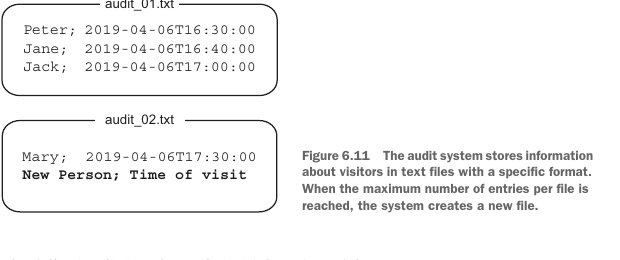
The sample project is an audit system that keeps track of all visitors in an organization. It uses flat text files as underlying storage with the structure shown in figure 6.11. The system appends the visitor’s name and the time of their visit to the end of the most recent file. When the maximum number of entries per file is reached, a new file with an incremented index is created.
示例项目是一个审计系统,用来跟踪组织中的所有访客。它使用普通文本文件作为底层存储,结构如图 6.11 所示。系统会把访客姓名和访问时间追加到最新文件的末尾。当每个文件的最大条目数达到上限时,会创建一个索引递增的新文件。
The following listing shows the initial version of the system.
下面的清单展示了系统的初始版本。
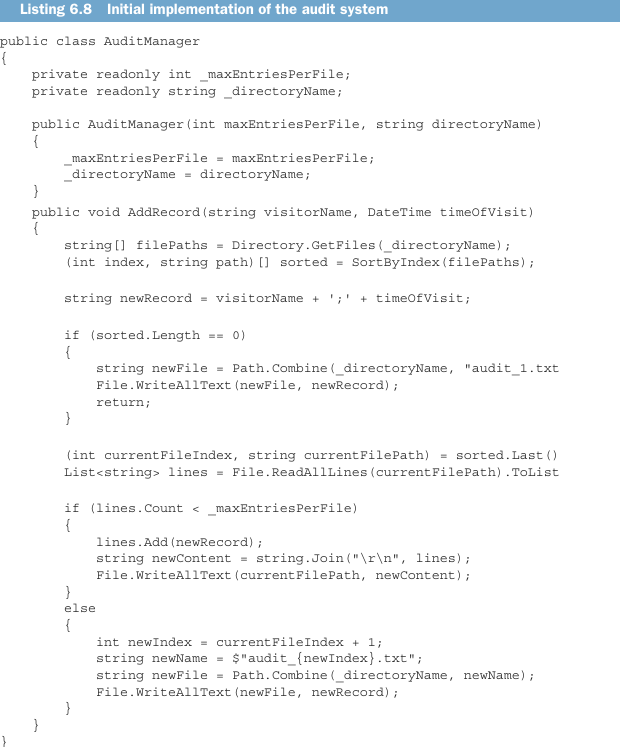
The code might look a bit large, but it’s quite simple. AuditManager is the main class in the application. Its constructor accepts the maximum number of entries per file and the working directory as configuration parameters. The only public method in the class is AddRecord, which does all the work of the audit system:
这段代码看起来可能有点大,但其实很简单。AuditManager 是应用中的主类。它的构造函数接收每个文件的最大条目数和工作目录作为配置参数。这个类唯一的公共方法是 AddRecord,它完成审计系统的所有工作:
- Retrieves a full list of files from the working directory
从工作目录获取完整文件列表。 - Sorts them by index (all filenames follow the same pattern:
audit_{index}.txt[for example,audit_1.txt])
按索引排序(所有文件名都遵循同一模式:audit_{index}.txt,例如audit_1.txt)。 - If there are no audit files yet, creates a first one with a single record
如果还没有审计文件,就创建第一个文件,并写入单条记录。 - If there are audit files, gets the most recent one and either appends the new record to it or creates a new file, depending on whether the number of entries in that file has reached the limit
如果已有审计文件,就获取最新的那个,并根据该文件条目数是否达到上限,选择把新记录追加进去,或创建一个新文件。
The AuditManager class is hard to test as-is, because it’s tightly coupled to the filesystem. Before the test, you’d need to put files in the right place, and after the test finishes, you’d read those files, check their contents, and clear them out (figure 6.12).
AuditManager 类按原样很难测试,因为它与文件系统紧密耦合。测试前,你需要把文件放到正确位置;测试结束后,你需要读取这些文件、检查它们的内容,并清理它们(图 6.12)。
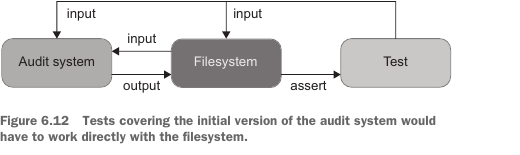
You won’t be able to parallelize such tests—at least, not without additional effort that would significantly increase maintenance costs. The bottleneck is the filesystem: it’s a shared dependency through which tests can interfere with each other’s execution flow.
你无法并行化这类测试——至少不能在不额外投入大量工作、显著增加维护成本的情况下做到。瓶颈在文件系统:它是共享依赖,测试可能通过它互相干扰执行流程。
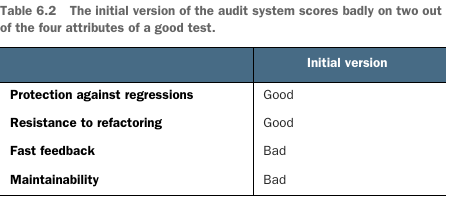
The filesystem also makes the tests slow. Maintainability suffers, too, because you have to make sure the working directory exists and is accessible to tests—both on your local machine and on the build server. Table 6.2 sums up the scoring.
文件系统也会让测试变慢。可维护性也会受损,因为你必须确保工作目录存在,并且测试可以访问它——无论是在本地机器上,还是在构建服务器上。表 6.2 总结了评分。
By the way, tests working directly with the filesystem don’t fit the definition of a unit test. They don’t comply with the second and the third attributes of a unit test, thereby falling into the category of integration tests (see chapter 2 for more details):
顺便说一下,直接与文件系统交互的测试并不符合单元测试的定义。它们不满足单元测试的第二和第三个属性,因此属于集成测试范畴(更多细节见第 2 章):
- A unit test verifies a single unit of behavior,
单元测试验证单个行为单元, - Does it quickly,
快速完成, - And does it in isolation from other tests.
并且与其他测试隔离执行。
6.4.2 Using mocks to decouple tests from the filesystem
6.4.2 使用 mock 将测试与文件系统解耦
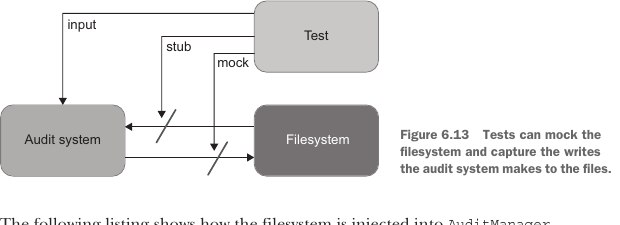
The usual solution to the problem of tightly coupled tests is to mock the filesystem. You can extract all operations on files into a separate class (IFileSystem) and inject that class into AuditManager via the constructor. The tests will then mock this class and capture the writes the audit system do to the files (figure 6.13).
解决测试紧耦合问题的常见方案是 mock 文件系统。你可以把所有文件操作提取到一个单独的类(IFileSystem)中,并通过构造函数把这个类注入 AuditManager。然后,测试会 mock 这个类,并捕获审计系统对文件执行的写入操作(图 6.13)。
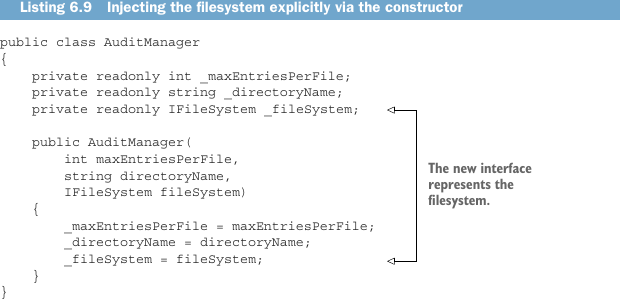
The following listing shows how the filesystem is injected into AuditManager.
下面的清单展示了如何把文件系统注入 AuditManager。
And next is the AddRecord method.
接下来是 AddRecord 方法。
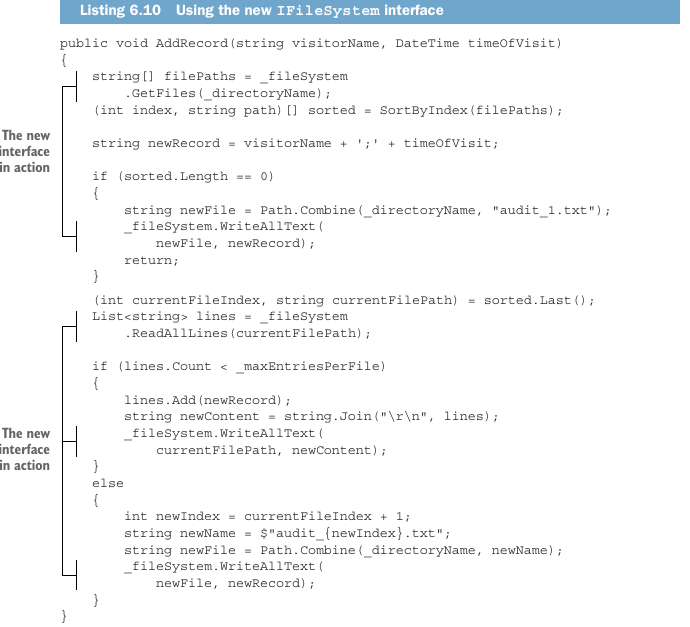
In listing 6.10, IFileSystem is a new custom interface that encapsulates the work with the filesystem:
在清单 6.10 中,IFileSystem 是一个新的自定义接口,它封装了与文件系统相关的工作:
public interface IFileSystem
{
    string[] GetFiles(string directoryName);
    void WriteAllText(string filePath, string content);
    List<string> ReadAllLines(string filePath);
}
Now that AuditManager is decoupled from the filesystem, the shared dependency is gone, and tests can execute independently from each other. Here’s one such test.
现在 AuditManager 已经与文件系统解耦,共享依赖消失了,测试可以彼此独立执行。下面就是这样一个测试。
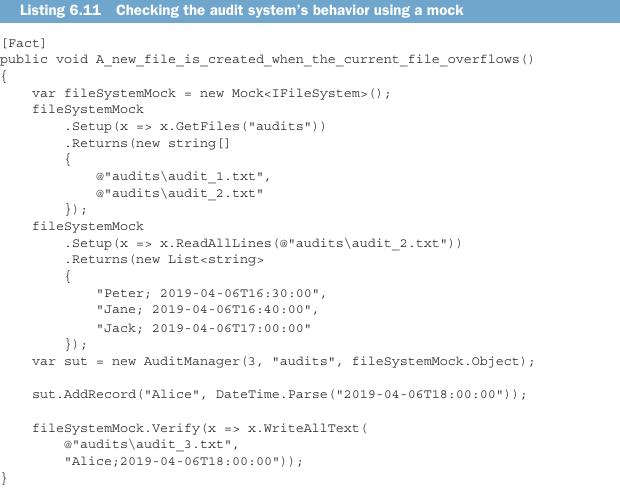
This test verifies that when the number of entries in the current file reaches the limit (3, in this example), a new file with a single audit entry is created. Note that this is a legitimate use of mocks. The application creates files that are visible to end users (assuming that those users use another program to read the files, be it specialized software or a simple notepad.exe). Therefore, communications with the filesystem and the side effects of these communications (that is, the changes in files) are part of the application’s observable behavior. As you may remember from chapter 5, that’s the only legitimate use case for mocking.
该测试验证的是:当当前文件中的条目数达到上限(本例中为 3)时,会创建一个只包含单条审计记录的新文件。请注意,这是 mock 的合法使用。应用创建的文件对最终用户可见(假设这些用户使用另一个程序读取文件,无论是专用软件还是简单的 notepad.exe)。因此,与文件系统的通信以及这些通信产生的副作用(也就是文件变化)属于应用的可观察行为。你可能还记得第 5 章,这正是 mocking 的唯一合法用例。
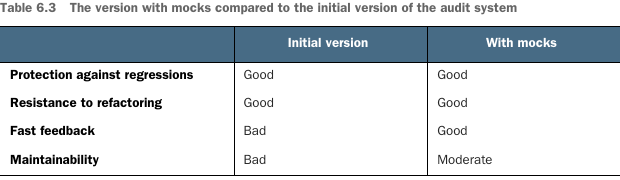
This alternative implementation is an improvement over the initial version. Since tests no longer access the filesystem, they execute faster. And because you don’t need to look after the filesystem to keep the tests happy, the maintenance costs are also reduced. Protection against regressions and resistance to refactoring didn’t suffer from the refactoring either. Table 6.3 shows the differences between the two versions.
这个替代实现相比初始版本有所改进。由于测试不再访问文件系统,它们执行得更快。而且因为你不需要照看文件系统来让测试正常运行,维护成本也降低了。防止回归和抗重构能力也没有因这次重构而受损。表 6.3 展示了两个版本之间的差异。
We can still do better, though. The test in listing 6.11 contains convoluted setups, which is less than ideal in terms of maintenance costs. Mocking libraries try their best to be helpful, but the resulting tests are still not as readable as those that rely on plain input and output.
不过,我们仍然可以做得更好。清单 6.11 中的测试包含复杂的 setup,从维护成本角度看并不理想。Mocking 库会尽力提供帮助,但最终得到的测试仍然不如依赖普通输入和输出的测试可读。
6.4.3 Refactoring toward functional architecture
6.4.3 向函数式架构重构
Instead of hiding side effects behind an interface and injecting that interface into AuditManager, you can move those side effects out of the class entirely. AuditManager is then only responsible for making a decision about what to do with the files. A new class, Persister, acts on that decision and applies updates to the filesystem (figure 6.14).
与其把副作用隐藏在接口后面并把接口注入 AuditManager,不如把这些副作用完全移出这个类。这样,AuditManager 只负责决定如何处理文件。一个新类 Persister 会执行该决策,并把更新应用到文件系统(图 6.14)。
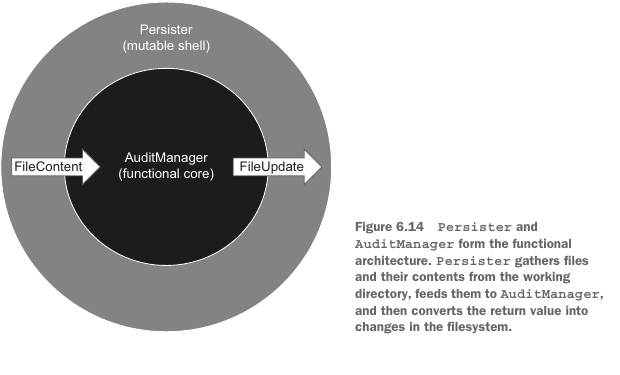
Persister in this scenario acts as a mutable shell, while AuditManager becomes a functional (immutable) core. The following listing shows AuditManager after the refactoring.
在这个场景中,Persister 充当可变壳,而 AuditManager 变成函数式(不可变)核心。下面的清单展示了重构后的 AuditManager。
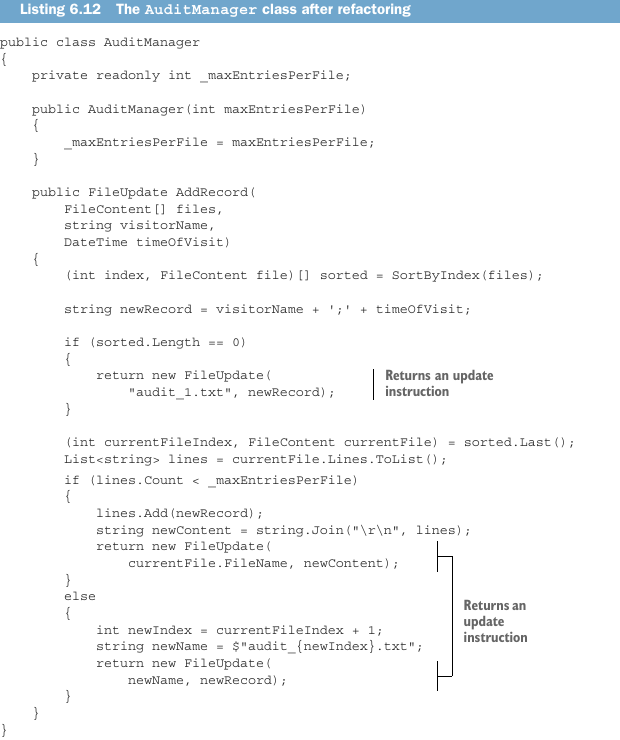
Instead of the working directory path, AuditManager now accepts an array of FileContent. This class includes everything AuditManager needs to know about the filesystem to make a decision:
AuditManager 现在不再接收工作目录路径,而是接收 FileContent 数组。这个类包含了 AuditManager 做出决策所需了解的所有文件系统信息:
public class FileContent
{
    public readonly string FileName;
    public readonly string[] Lines;

    public FileContent(string fileName, string[] lines)
    {
        FileName = fileName;
        Lines = lines;
    }
}
And, instead of mutating files in the working directory, AuditManager now returns an instruction for the side effect it would like to perform:
而且,AuditManager 现在不再修改工作目录中的文件,而是返回一条它想要执行的副作用指令:
public class FileUpdate
{
    public readonly string FileName;
    public readonly string NewContent;

    public FileUpdate(string fileName, string newContent)
    {
        FileName = fileName;
        NewContent = newContent;
    }
}
The following listing shows the Persister class.
下面的清单展示了 Persister 类。
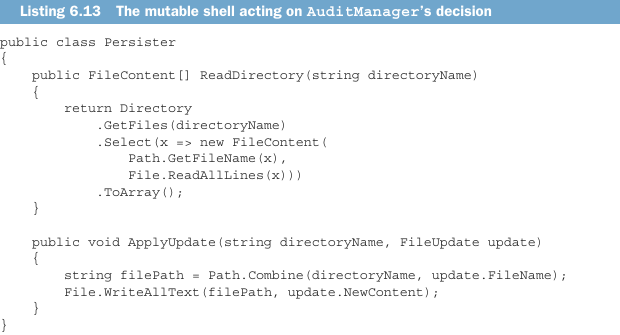
Notice how trivial this class is. All it does is read content from the working directory and apply updates it receives from AuditManager back to that working directory. It has no branching (no if statements); all the complexity resides in the AuditManager class. This is the separation between business logic and side effects in action.
注意这个类是多么简单。它所做的全部事情就是从工作目录读取内容,并把从 AuditManager 收到的更新应用回该工作目录。它没有分支(没有 if 语句);所有复杂性都位于 AuditManager 类中。这就是业务逻辑与副作用分离的实际体现。
To maintain such a separation, you need to keep the interface of FileContent and FileUpdate as close as possible to that of the framework’s built-in file-interaction commands. All the parsing and preparation should be done in the functional core, so that the code outside of that core remains trivial. For example, if .NET didn’t contain the built-in File.ReadAllLines() method, which returns the file content as an array of lines, and only has File.ReadAllText(), which returns a single string, you’d need to replace the Lines property in FileContent with a string too and do the parsing in AuditManager:
为了保持这种分离,你需要让 FileContent 和 FileUpdate 的接口尽可能接近框架内置文件交互命令的接口。所有解析和准备工作都应该在函数式核心中完成,这样核心之外的代码就能保持简单。例如,如果 .NET 没有内置的 File.ReadAllLines() 方法(该方法以行数组形式返回文件内容),而只有返回单个字符串的 File.ReadAllText(),那么你也需要把 FileContent 中的 Lines 属性替换为字符串,并在 AuditManager 中完成解析:
public class FileContent
{
    public readonly string FileName;
    public readonly string Text; // previously, string[] Lines;
}
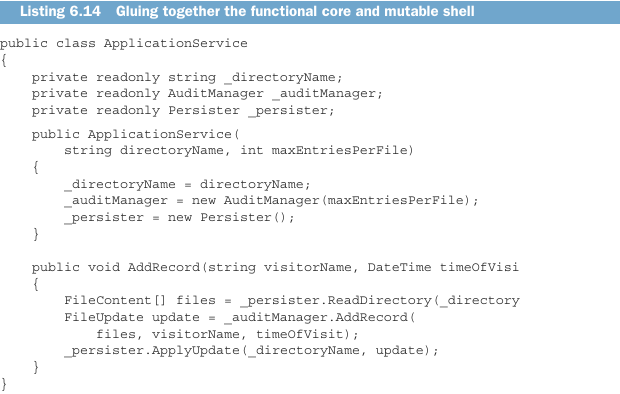
To glue AuditManager and Persister together, you need another class: an application service in the hexagonal architecture taxonomy, as shown in the following listing.
为了把 AuditManager 和 Persister 粘合起来,你还需要另一个类:按六边形架构分类,它是一个应用服务,如下面清单所示。
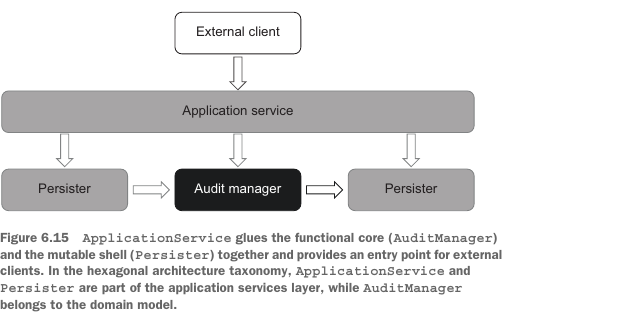
Along with gluing the functional core together with the mutable shell, the application service also provides an entry point to the system for external clients (figure 6.15). With this implementation, it becomes easy to check the audit system’s behavior. All tests now boil down to supplying a hypothetical state of the working directory and verifying the decision AuditManager makes.
除了把函数式核心与可变壳粘合在一起,应用服务还为外部客户端提供了进入系统的入口点(图 6.15)。通过这个实现,检查审计系统行为变得很容易。现在所有测试都简化为:提供一个假设的工作目录状态,并验证 AuditManager 做出的决策。
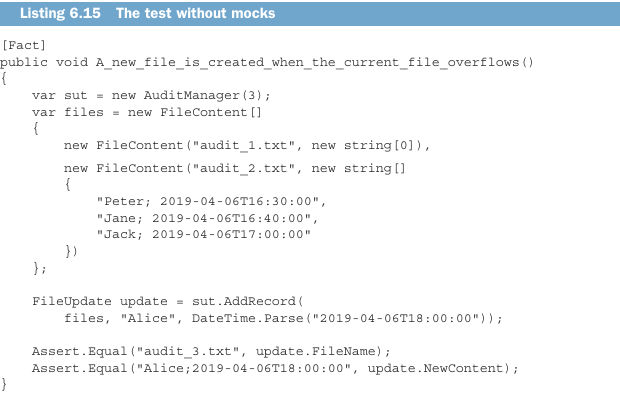
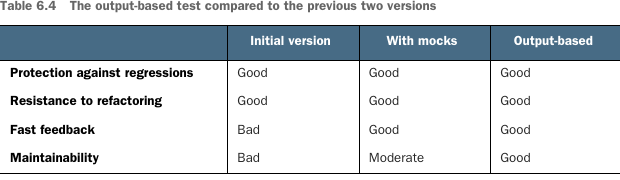
This test retains the improvement the test with mocks made over the initial version (fast feedback) but also further improves on the maintainability metric. There’s no need for complex mock setups anymore, only plain inputs and outputs, which helps the test’s readability a lot. Table 6.4 compares the output-based test with the initial version and the version with mocks.
这个测试保留了 mock 版本相比初始版本带来的改进(快速反馈),同时进一步改善了可维护性指标。不再需要复杂的 mock setup,只有普通输入和输出,这大大提升了测试可读性。表 6.4 将基于输出的测试与初始版本和 mock 版本进行比较。
Notice that the instructions generated by a functional core are always a value or a set of values. Two instances of such a value are interchangeable as long as their contents match. You can take advantage of this fact and improve test readability even further by turning FileUpdate into a value object. To do that in .NET, you need to either convert the class into a struct or define custom equality members. That will give you comparison by value, as opposed to the comparison by reference, which is the default behavior for classes in C#. Comparison by value also allows you to compress the two assertions from listing 6.15 into one:
注意,函数式核心生成的指令始终是一个值或一组值。只要内容匹配,这样的两个值实例就是可互换的。你可以利用这一点,把 FileUpdate 转换为值对象,从而进一步提升测试可读性。在 .NET 中,要做到这一点,你需要把该类转换为 struct,或者定义自定义相等性成员。这会让你获得按值比较,而不是 C# 中类默认的按引用比较。按值比较还允许你把清单 6.15 中的两个断言压缩为一个:
Assert.Equal(
    new FileUpdate("audit_3.txt", "Alice;2019-04-06T18:00:00"),
    update);
Or, using Fluent Assertions,
或者,使用 Fluent Assertions:
update.Should().Be(
    new FileUpdate("audit_3.txt", "Alice;2019-04-06T18:00:00"));
6.4.4 Looking forward to further developments
6.4.4 展望进一步发展
Let’s step back for a minute and look at further developments that could be done in our sample project. The audit system I showed you is quite simple and contains only three branches:
我们先退后一步,看看示例项目还可以有哪些进一步发展。我展示的审计系统相当简单,只包含三个分支:
- Creating a new file in case of an empty working directory
在工作目录为空时创建新文件。 - Appending a new record to an existing file
向已有文件追加新记录。 - Creating another file when the number of entries in the current file exceeds the limit
当当前文件中的条目数超过上限时创建另一个文件。
Also, there’s only one use case: addition of a new entry to the audit log. What if there were another use case, such as deleting all mentions of a particular visitor? And what if the system needed to do validations (say, for the maximum length of the visitor’s name)?
此外,这里只有一个用例:向审计日志添加新条目。如果还有另一个用例,比如删除某个特定访客的所有提及,该怎么办?如果系统还需要做校验(比如校验访客姓名的最大长度),又该怎么办?
Deleting all mentions of a particular visitor could potentially affect several files, so the new method would need to return multiple file instructions:
删除某个特定访客的所有提及可能会影响多个文件,因此新方法需要返回多条文件指令:
public FileUpdate[] DeleteAllMentions(
    FileContent[] files, string visitorName)
Furthermore, business people might require that you not keep empty files in the working directory. If the deleted entry was the last entry in an audit file, you would need to remove that file altogether. To implement this requirement, you could rename FileUpdate to FileAction and introduce an additional ActionType enum field to indicate whether it was an update or a deletion.
另外,业务人员可能要求你不要在工作目录中保留空文件。如果被删除的条目是某个审计文件中的最后一条,你就需要彻底移除该文件。为了实现这个需求,你可以把 FileUpdate 重命名为 FileAction,并引入一个额外的 ActionType 枚举字段,用来表示这是更新还是删除。
Error handling also becomes simpler and more explicit with functional architecture. You could embed errors into the method’s signature, either in the FileUpdate class or as a separate component:
使用函数式架构时,错误处理也会变得更简单、更显式。你可以把错误嵌入到方法签名中,可以放在 FileUpdate 类里,也可以作为单独组件:
public (FileUpdate update, Error error) AddRecord(
    FileContent[] files,
    string visitorName,
    DateTime timeOfVisit)
The application service would then check for this error. If it was there, the service wouldn’t pass the update instruction to the persister, instead propagating an error message to the user.
应用服务随后会检查这个错误。如果错误存在,服务就不会把更新指令传给 persister,而是把错误消息传播给用户。